Thank you for your contribution @melanieyoung !
Some remarks from my side:
TV output settings
This is one of the challenging parts. Many TV manufacturers offer settings in the TV menu’s for ‘lip-sync’ or ‘audio delay’, But unfortunately, I have only seen that adjusting this setting does not close the gap. In fact, sometimes the gap even increases, because it is ‘audio delay’ and what I need is ‘Video delay’. I have also seen that ‘Lip sync’ could be set as a negative number, e.g. -3, which suggests a kind of video delay. But in practice it does not work.
Low-latency codex like aptX
aptX is a bluetooth codec and operates on a bluetooth connection. In my setup I need to use WiFi.
Solution / Arylic request
What I think would still be the best solution, is if Acrylic would implement WISA. I am aware that implementing this, probably involves a quite high WISA-license cost. But:
For connecting WiFi-based wireless speakers to TV’s there are hardly good products to do so. So there is still a gap in the market to fulfill = opportunity for Arylic.
I would need it implemented with the Up2Stream Mini. And I can imagine that it would work if Arylic a) either makes a Mini+ with the WISA support integrated, or b) have a small plug-in sold optional to the Mini board.
Wireless audio lag with Arylic setups stems from internal conversion and buffering steps, which current technology has trouble minimizing below one second. TV settings for lip-sync or delay do not speed up video, so they rarely help in practice.
The most consistent fix is sticking to a wired connection, since wireless options—especially WiFi-based—still add unavoidable delay; Bluetooth aptX Low Latency can help, but only if your devices and TV support it, and often isn’t available with Arylic multi-room systems. Firmware updates and alternative outputs sometimes make a minor improvement but won’t eliminate the delay entirely.
If synchronized TV audio wirelessly is essential, a system specifically built for very low latency or using new protocols like Auracast may be needed—current Arylic solutions are not fully optimized for real-time TV viewing.
I am a new owner of a Up2Stream Mini V4 and I like it in general. There is a very bad issue though about audio lag.
I can experience the audio is out of sync when streaming audio from my Apple TV and the same when streaming audio from my iPhone watching a YouTube video. The same happens just streaming music from my library or Spotify, even if being this audio only the issue is not that bad.
I’ve tried to check every possible setting for the Up2Stream Mini, the Apple TV, my iPhone, the WiFi router and network, where the signal is in general very good for all the devices, but with no avail.
I can use Bluetooth streaming and this works properly, however my primary goal was to be able to Airplay from my Mac to the external speakers and also connect my Apple TV to them. As I wrote, with the Apple TV is basically unusable and for just audio, the lag is still very annoying.
Your finding about audio lag is a common issue. For your assurance, it has nothing to do with your Up2Stream product.
Here’s a quick explanation
When audio and video signals are coming in, they are synched to be handled by a display, with no lag between them.
When instead of using the TV-speakers, the audio goes to wireless speakers; the audio signals has to be converted from analog to digital and be send wirelessly > received, converted back from digital to analog. This take some time and creates an annoying time-lag. It’s like on your TV you see someone saying hello, but you hear that 0.5 secs later.
What you would need, is a TV/AppleTV being able to make settings for video delay. Cause with wireless speakers, the video signal to the display needs to be slowed down.
There is one standard that handles that, but obviously, both the TV and the speakers have to be compatible with that standard. It’s called WISA.
Some speaker brands (like Sonos) offer wireless speakers for use with TV’s, but they have implemented a ‘trick’. They have a set of a soundbar and two wireless speakers. The soundbar gets connected to the TV (cable/not wireless), and the soundbar handles the two wireless speakers. BUT, those wireless speakers are configured as rear speakers. And this is the trick, the audio signal to rear speakers is small. So handling that wirelessly, does not cause time lags.
From most people I hear this does not work for them. Cause they would like to have this wireless speakers as front speakers. While a soundbar does not really create a stereo effect.
I do understand the problem about the double conversion AD and DA however I thought the AirPlay protocol could handle this.
Putting aside the TV problem, I experience the same lag (about 2 secs) when streaming music from my iPhone. Less annoying due to no lip sync is needed, but still problematic, as it starts and stops playing with a 2 secs delay.
Nonetheless I have to point the fact that, if I stream audio from my iPhone to the Apple TV, I get no lag at all, even if the position and WiFi signal are the same of the Up2Stream Mini.
Additionally I can now see even Bluetooth streaming is very slightly out of sync.
That’s what makes me think the problem is indeed the Up2Stream Mini as other devices doing AirPlay (mostly Macs and iPhones) have no issues at all.
You are probably streaming to the Up2Stream Mini as an AirPlay Device?
Working this way, I experience the same. Apple AirPlay needs a ‘lot’ (2 secs) of time to built the connection/buffer/start streaming.
I understood this is better with AirPlay2 (Mini is AirPlay 1st gen.).
I think what you are experiencing is that Apple to Apple connectivity based on AirPlay2, works best (in AirPlay mode).
I don’t use AirPlay on the Mini’s and my streaming hardly has time lag.
I have the Up2Stream Mini connected to my vintage HiFi and I’d like to stream music from my library on my Mac (Apple Music) and Spotify. Additionally I would like to stream from iPhone occasionally and possibly also stream movie’s audio from my Apple TV.
So, the first application streaming from your Mac is pretty straightforward. Youn will see your Mini in the available wireless speakers, and you will stream based on Spotify Connect (so, not via AirPlay). This should work seamlessly.
Same goes for streaming from iPhone, this also goes via Spotify Connect (not AirPlay), and should also work seamlessly.
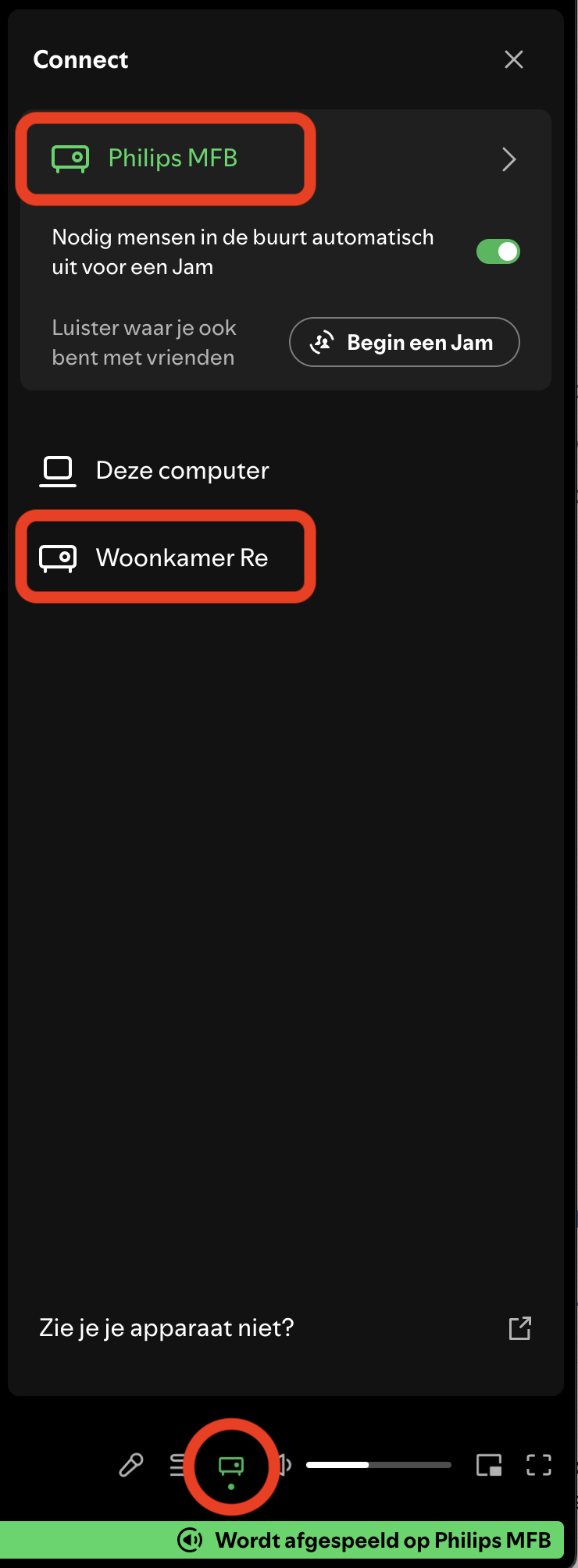
In the screenshot below I have added an example of Spotify on iMac. At the bottom in the red circle, the wireless spearer icon. If you click on that, the list above will show. In my case two wireless speakers (red boxes), both based on a Mini.
Streaming the audio of a movie that comes from your Apple TV …
AppleTV combined with AirPlay 2 wireless speakers, will not have issues with time lag between video and audio. So, this should work. But (a) your Apple TV then needs to be AirPlay 2 compatible (see list below), and (b) your speaker too. The Mini unfortunately does not support AirPlay 2.
Well, at least … when you want to have audio & video synched from Apple TV to your speakers, there are alternative Arylic products supporting AirPlay2. So, you can still make it work.
As I have not seen AirPlay2 working with audio & video without time-lag, I cannot guarantee it 100%. But from the available info, it should work.
I understand your disappointment — that’s completely fair.
Based on what you describe, I think this is mainly a mismatch between the intended use case and the capabilities of the Up2Stream Mini, rather than a defect or poor quality of the product itself.
The Mini works well for network audio (Spotify Connect, local streaming, multiroom music).
However, for Apple TV or video use cases where audio/video sync is critical, you need a system that can actively control lip-sync (for example AirPlay 2 end-to-end, WiSA, or a TV-centric solution). The Mini was never designed for that role.
I have worked with Arylic products for years, and I am happy with them. And yes, also for me; it is all about the right product matching to the use case. And in this case a very specific one.
Thanks for sharing your experience; this will definitely help others make a more informed choice!