ESP32-Based Controller for Up2Stream Devices - “Jukebox Jamz”
Hey everyone! I wanted to share a DIY project I’ve been working on that some of you might find interesting - an ESP32-based web interface for controlling Up2Stream devices.
Why Build This?
I have multiple Up2Stream boards installed in vintage equipment around my house, and while the 4STREAM app works great, I wanted something I could access from any browser without needing to install an app. I also wanted a dedicated wall-mounted tablet interface for quick control - no login, no password, just open and play.
What It Does
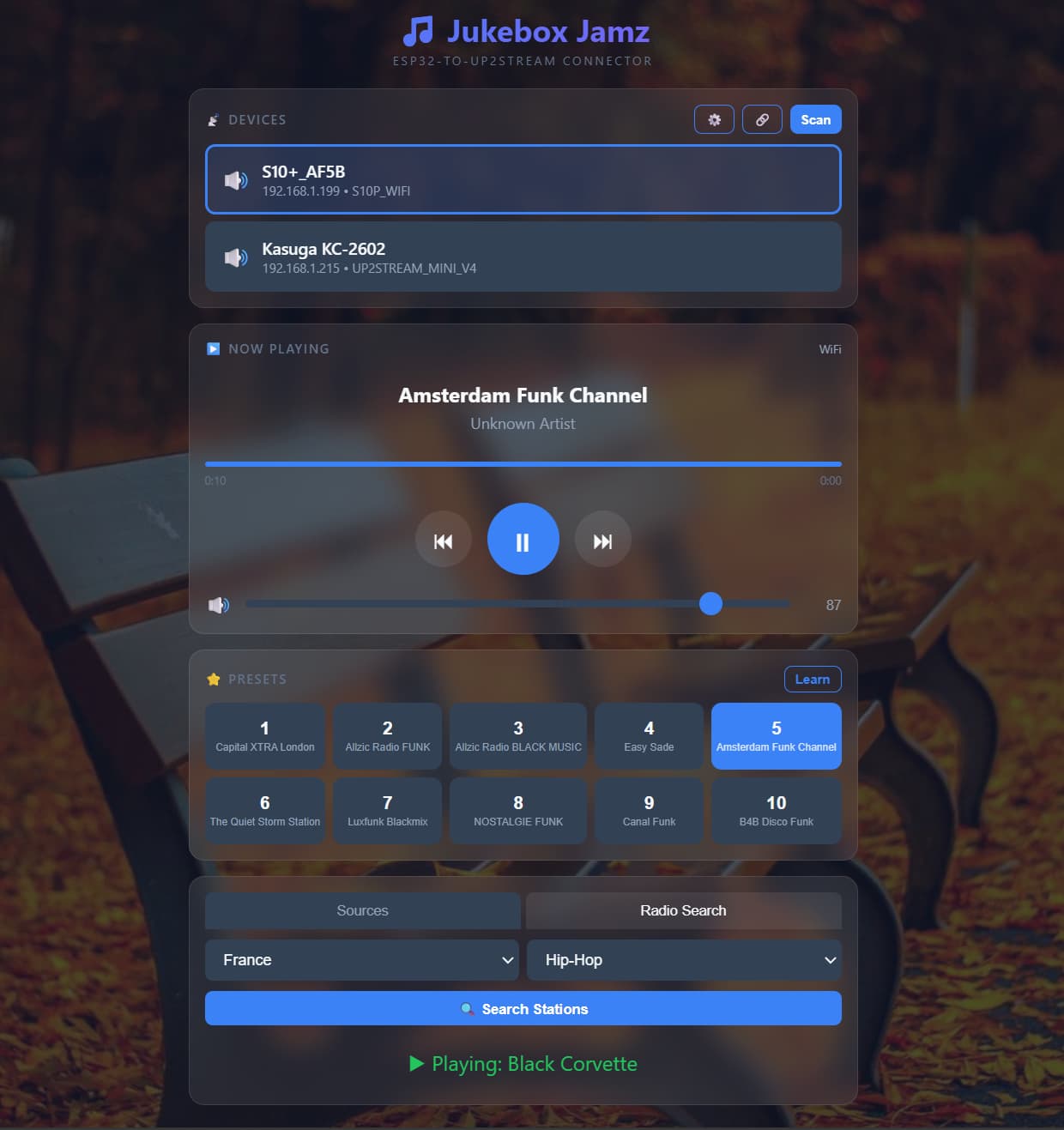
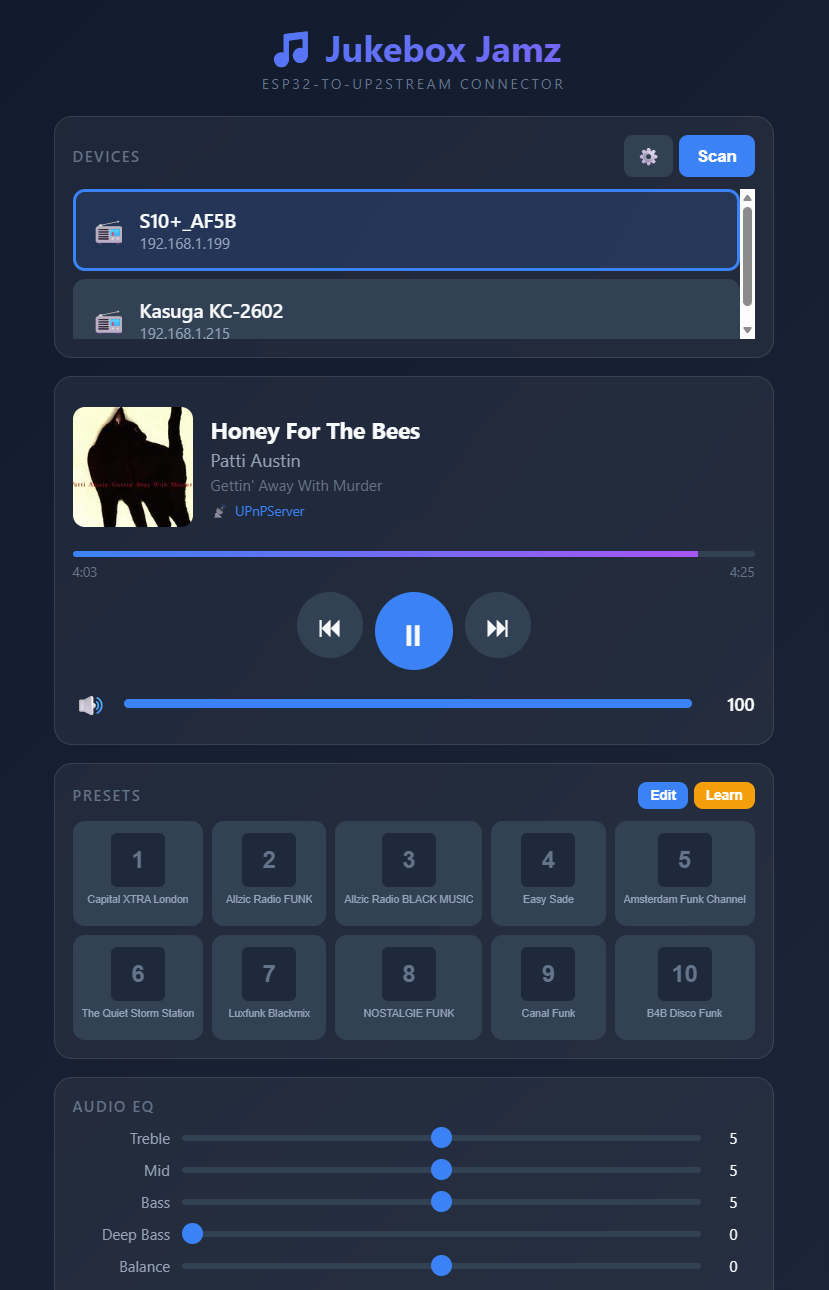
I built a standalone ESP32 controller that serves its own web interface. You access it at http://jukebox.local from any device on your network - phone, tablet, laptop, whatever. No app installation needed, and no password required to access any functions.
Features:
- Auto-discovery - Finds all Up2Stream devices on your network via mDNS and IP scanning
- Multi-device support - Switch between devices with one tap
- 10 Presets with “Learn Mode” - Play a station, tap Learn, tap a preset button - it captures the station name automatically
- Full playback control - Play/pause, skip, volume, mute
- Source switching - WiFi, Bluetooth, AUX, Optical, USB, DAC, Coax
- Internet radio search - Search by country and genre, play directly
- Multiroom grouping - Create and manage synchronized playback groups just like the 4STREAM mobile app! Select a master device, tap to add slaves, adjust individual volumes, remove devices or ungroup - all from the browser
- Customizable backgrounds - Just for fun, pulls random themed images
How It Compares to the Built-in Arylic Web Interface
For those who don’t know, each Up2Stream device has a built-in web interface at its IP address (e.g., http://192.168.1.10). Here’s how my ESP32 controller compares:
| Feature | Arylic Built-in | ESP32 Jukebox Jamz |
|---|---|---|
| Access method | Device IP only | mDNS hostname (jukebox.local) |
| Authentication | PW required | None - instant access |
| Multi-device | One device per page | All devices in one interface |
| Device discovery | Manual IP entry | Automatic network scan |
| Preset names | Can’t customize | Custom names + auto-learn |
| Radio search | Limited | Full search |
| Multiroom | Not available | Full group management (like 4STREAM app!) |
| Mobile-friendly | Basic | Fully responsive |
| Customization | None | Themes, backgrounds |
| Always available | Only when device on | Dedicated controller |
Where the built-in interface wins:
- Direct connection (no middleman)
- No additional hardware needed
- Shows more technical details (firmware, network config) -FIXED
- EQ and advanced audio settings - FIXED
Where my ESP32 wins:
- Single interface for ALL your Up2Stream devices
- Much faster device switching
- No password or login required - just open and control
- Multiroom control from any browser (the killer feature for me - same convenience as 4STREAM app but on any device!)
- Preset learning captures station names
- Works great on wall-mounted tablets
- mDNS means you never need to remember IP addresses
The Hardware
Super simple - just an ESP32 dev board. I’m using an ESP32-S3 but any WiFi capable ESP32 works. Total cost maybe $8-10. Power it via USB.
For my setup, I have it running 24/7 on ESP32 board mounted beneath my desk and a wall-mounted tablet in my living room. The tablet just has a browser bookmark to http://jukebox.local.
Technical Notes
The ESP32 talks to your Up2Stream devices using the same HTTP API that the 4STREAM app uses. It’s basically a proxy/aggregator that makes controlling multiple devices much more convenient.
The multiroom feature was the main reason I built this. I wanted the same “tap to group devices” experience from the 4STREAM app, but accessible from a wall tablet or laptop. It uses the documented API commands:
- ConnectMasterAp:JoinGroupMaster for grouping devices
- multiroom:getSlaveList for getting group status
- multiroom:SlaveVolume for individual slave volume control
- multiroom:SlaveKickout for removing devices
- multiroom:Ungroup for dissolving the group
Works exactly like the mobile app - pick a master, add slaves, they all play in sync.
Would Anyone Want the Code?
If there’s interest, I’m happy to share the Arduino sketch. It’s a single .ino file, about 1200 lines including the embedded HTML/CSS/JavaScript.
Fair warning - it’s definitely a hobbyist project, not polished commercial software. But it works great for my needs and might give others a starting point for their own customizations.
Let me know if you have questions! Always happy to chat about Up2Stream projects.